

Data Solutions
Google Datastore to DynamoDB Migration: A Practical Case Study
A fast-growing AI/ML startup was transitioning its infrastructure from Google Cloud to AWS, requiring a full-scale migration of its data architecture. Their system relied on Google Datastore, which offered a serverless NoSQL database solution. After evaluating multiple database solutions as the target system, we selected Amazon DynamoDB for its scalability, performance, and native AWS integration.
This case study breaks down the migration process, key challenges, and lessons learned to help teams facing similar transitions.

Understanding the Source: Google Datastore
Google Datastore is a fully serverless NoSQL document store with virtually infinite scalability. This made it an ideal solution for our customer, whose unpredictable traffic spikes demanded a system that could dynamically scale without manual intervention.
Key attributes of Google Datastore:
- Automatic Indexing: Every simple field is indexed by default. This means that simple queries can be executed without any additional setup.
- Eventual Consistency: Strong consistency is limited to entity groups.
- Nested Properties: Supports embedded documents and indexing nested properties.
- Limited Querying Capabilities: Lacks support for complex joins or aggregations.
Evaluating Target Database Options
*If you are only interested in the migration process, you may skip this section.
Migrating from Google Datastore to AWS required careful selection of the target database. Each option had strengths and weaknesses, making it essential to evaluate trade-offs before finalizing the choice. The decision ultimately came down to prioritizing key requirements.
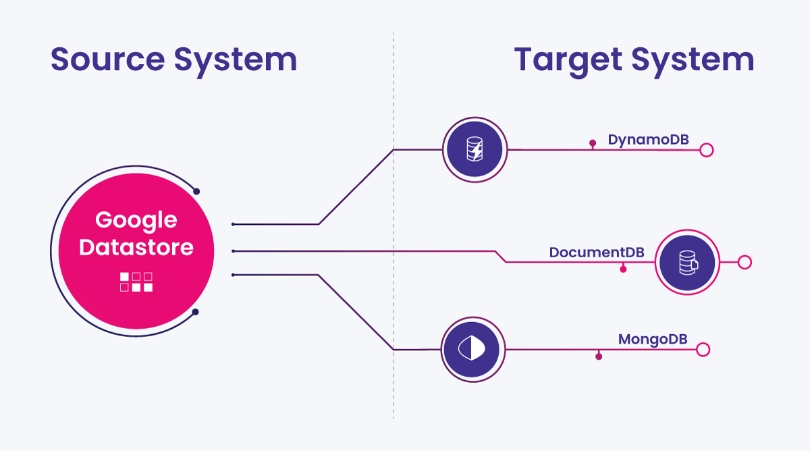
Target Systems Considered
- Amazon DynamoDB
Advantages: Fully serverless, scales seamlessly, integrates deeply with AWS.
Risks: DynamoDB and Datastore use fundamentally different data models—Datastore is a pure document-based database, while DynamoDB is a hybrid between a document store and a key-value store. DynamoDB’s model is more restrictive, requiring certain entity types to be refactored. Additionally, indexing requires more manual configuration in DynamoDB.
- MongoDB Atlas (Managed NoSQL Solution)
Advantages: Closest in structure to Google Datastore, supporting flexible indexing and document-based storage. Indexing works similarly to Datastore, making migration easier.
Risks: Not a serverless solution—requires manual capacity planning. Right-sizing is critical to avoid throttling errors, which is challenging because Google Cloud’s metrics cannot be directly applied. Additional Consideration: As a third-party managed service, it introduces external dependencies outside AWS.
- Amazon DocumentDB (AWS MongoDB-Compatible Engine)
Amazon DocumentDB shares the fundamental structure and indexing behavior of MongoDB Atlas, making the same risks and advantages relevant here as well. Comparing these two options we should mention:
Advantages: Keeping the solution within AWS would ensure native security, networking, and operational integration, reducing external dependencies.
Risks: Although structurally identical to MongoDB Atlas, DocumentDB is not as widely adopted or battle-tested at scale.
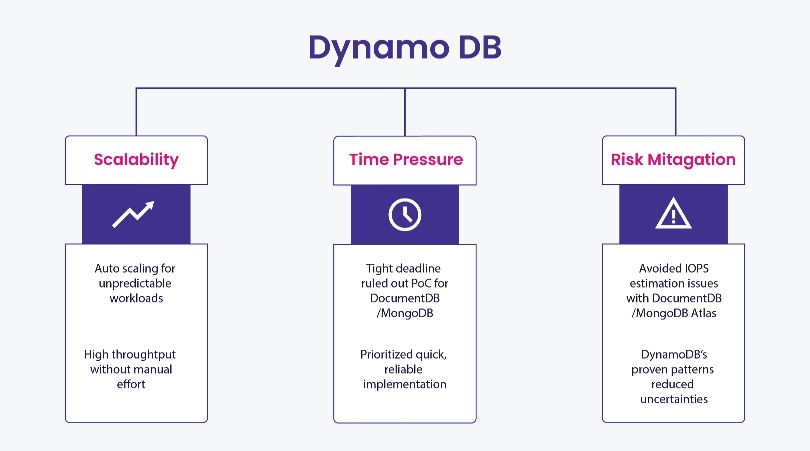
Final Decision: Why DynamoDB?
The team selected DynamoDB primarily because, despite its differences in data structure, it shares a critical similarity with Google Datastore: it is fully serverless. Unlike MongoDB Atlas or DocumentDB, which require capacity planning and right-sizing to prevent throttling issues, DynamoDB scales automatically, eliminating the risk of capacity issues.
Additionally, its deep integration within the AWS ecosystem ensures long-term support and compatibility with other AWS services. As one of the most widely adopted databases in AWS, it also benefits from strong community support and best practices, making it a reliable choice for large-scale applications.

Key Differences and Migration Adjustments
While both Google Datastore and DynamoDB offer high-performance NoSQL capabilities, their architectural differences presented several challenges during the migration:

Migration Challenges and Solutions
Migrating from Google Datastore to DynamoDB presented several challenges due to fundamental differences in indexing, data structures, and storage mechanisms. The following key areas had to be adjusted to ensure compatibility:
1. Indexing Adjustments
Google Datastore automatically indexes all fields, while DynamoDB requires explicit index creation. The team:
- Analyzed query access patterns to determine which GSIs were essential.
- Avoided excessive indexing to prevent unnecessary costs.
2. Handling Nested Data
Datastore supports querying nested structures in embedded documents, while DynamoDB requires all indexed fields to be simple properties. To address this, the migration team:
- Flattened JSON structures into separate items linked via partition keys.
- Updated the application logic to always store relevant nested properties as simple fields, ensuring compatibility with DynamoDB’s indexing model.
3. Array Handling in Indexes
Google Datastore supports the indexing of arrays in a very straightforward manner. In DynamoDB, this was done by transforming such data into several units under one partition key (with different sort keys), implementing a single-table design.
4. Managing BLOB Data
Since DynamoDB doesn’t support large binary objects (BLOBs) natively, the team:
- Transitioned BLOB storage to Amazon S3
- Stored S3 object references in DynamoDB to maintain efficient retrieval.

Moving Data Between the Systems
In the previous sections, we covered the core differences between the two systems, focusing on how they impacted the application logic. Now, we'll turn to the data migration process.
Data extraction
Extracting data from Google Datastore at scale is not trivial. While at first glance Google provides several methods, most of them come with limitations that make them unsuitable for an enterprise-grade migration pipeline. The following options were considered:
1. Backup-Based Extraction
Google claims that Datastore backups use the open-source LevelDB format. However, in reality, the data is further wrapped in Protocol Buffers (protobufs), and the exact format of the latter is not officially documented. This means that while backups are supported, extracting structured data from them requires unofficial tooling, making correctness validation difficult for millions of entities.
2. BigQuery Import Alternative
We also explored transferring data into BigQuery as an intermediary step before migrating to DynamoDB. However, this approach had a major flaw: BigQuery truncates fields longer than 64 KB when importing Datastore backups. This made it unsuitable for preserving all data accurately.
3. API-Based Data Extraction
Given the limitations of backup-based and BigQuery-based extraction, we opted for the officially supported Google Datastore API. The API provided a robust, verifiable means of extracting data while maintaining consistency and correctness across the migration. On the other hand, scaling this approach required a little more finesse than the previously mentioned alternatives.
Scalable Migration Executor: AWS Batch
AWS Batch played a crucial role in the migration. It provided a distributed and scalable way to extract, transform, and load data from Google Datastore to DynamoDB, while reusing a large portion of the codebase already written for the application layer.
Key Considerations for AWS Batch
- Scalability - Leveraged parallel job execution to distribute workload efficiently
- Application-Level Compatibility - The Docker-based approach of AWS Batch allowed us to incorporate many of the application-level changes we'd already implemented, reducing additional migration overhead.
Since both the source system (Google Datastore) and the target system (AWS DynamoDB) are highly elastic and virtually infinitely scalable, the use of AWS Batch as an intermediate service became the final piece of the puzzle to a fully scalable migration process. By carefully tuning partition sizes and parallelism, we achieved a rapid migration and minimized downtime—a critical factor for maintaining business continuity.
Partitioning Datastore for Scalable Processing
To fully leverage AWS Batch’s scalability, data needed to be partitioned efficiently. Google Datastore’s QuerySplitter API enabled this by:
- Analyzing Data Distribution – The API estimated the distribution of entities and generated balanced partitions.
- Ensuring Non-Overlapping Key Ranges – It provided __key__ filters that avoided redundant or missing records.
- Enabling Parallel Processing – Each partition was processed independently, maximizing throughput and minimizing migration time.
By tuning partition sizes and optimizing parallel execution, we ensured AWS Batch could handle large volumes efficiently while keeping downtime minimal.
Downtime Considerations
Supporting a zero-downtime migration requires one key ingredient: a reliable way to track all changes made during the transition. In most systems, this comes in the form of a built-in change stream or CDC mechanism.
Google Datastore doesn’t offer anything like that.
Without native change tracking, the only alternative would’ve been to modify the application code to manually capture changes—adding logic to every write operation just to support the migration.
While technically feasible, this would have added weeks of engineering work, increased complexity, and introduced new risks. After reviewing the options together, the team and the customer agreed that a short, planned downtime was the more practical path forward.
Migration Validation
Once the migration was complete, the next priority was to confirm that the system behaved identically on the new backend.
This wasn’t as simple as comparing records field-by-field. Because of structural differences between Datastore and DynamoDB, comparing items based on their JSON representations would’ve been infeasible. The data wasn’t just stored in a new system—it was modeled differently.
Take blob storage, for example. In Datastore, binary payloads were embedded directly within entities. After the migration, those payloads were offloaded to S3, with only references remaining in DynamoDB. Other changes included flattened structures, renamed fields, and format adjustments—all of which meant that low-level equality checks wouldn’t reflect the real-world behavior of the system.
Instead, validation was driven through the application’s data access layer—the component responsible for retrieving and assembling records in a consistent way, regardless of where or how the underlying data was stored. Despite the differences in physical representation, this layer exposed a stable, uniform interface across both versions of the system.
To verify correctness, we ran a full comparison using its batch listing methods. The job itself was distributed via AWS Batch, reusing the same infrastructure we had leveraged during earlier phases of the migration. This approach ensured that validation reflected what the application logic actually consumed, rather than what was stored behind the scenes.
Future Considerations
Wherever possible, we aimed to keep changes contained within the application’s data access layer, avoiding a ripple effect across the rest of the codebase. This boundary made the migration more manageable—and significantly simplified validation.
But that same boundary also came with trade-offs. Parts of the data access layer still reflect patterns shaped by Datastore’s model. Over time, these areas can be revisited to take full advantage of DynamoDB’s capabilities.
Final Thoughts
Migrating from Google Datastore to DynamoDB required more than just data transfer—it involved rethinking data structures, revisiting indexing strategies, and tuning for performance in a new environment.
By following the steps highlighted in this case study—especially around application-layer adaptation, query access modeling, and validation approaches—you can reduce uncertainty and avoid late-stage rework in similar projects.


